Fuel Card Fraud Handling Process
1. Log in to the EFS Portal
Start your investigation by accessing the EFS portal:
https://emgr.efsllc.com/cards/CardLookup.action
2. Review the Transaction Log
Open the Transaction Log and check all transactions for the reported date.
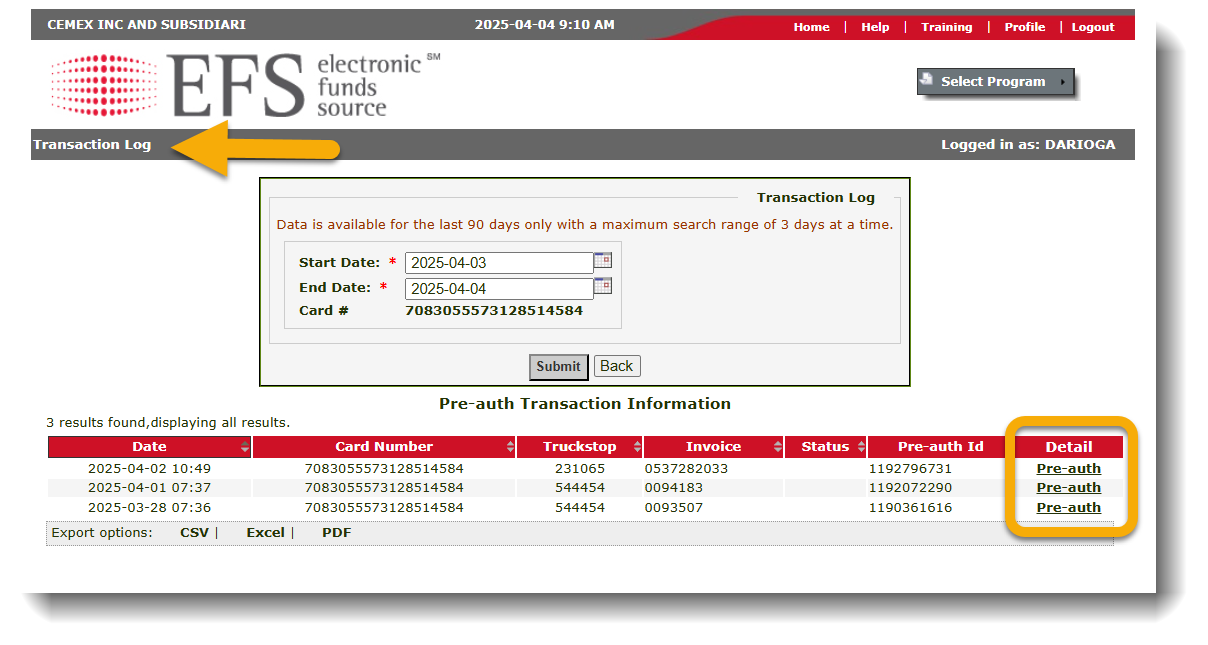
3. Identify Pre-Authorizations
Look for pre-authorizations listed on the same day. Make note of the time and result for each one.
A Pre-authorization in EFS indicates when a driver swipes the card or attempts to purchase fuel using truck stop phone apps.
4. Verify Purchase Details
Count all pre-authorizations and completed transactions. Note control numbers. More than two pre-auths should be clarified with the driver.
Dispatch Team Action: Gather Driver Info
- Did the driver fuel on the reported date/time?
- Did they use the Pilot app? Were there any errors?
- Did they swipe the card at the pump?
- Did they hand the card to the store clerk?
- Was the pump closed when fueling ended?
- Who provided the receipt?
- Request a full description of their fueling process.
Driver Responsibility Reminder
- Monitor daily fuel purchases
- Ensure the pump is fully closed after fueling
- Report unauthorized transactions immediately
- Be aware: with Dynamic PINs, fraud is highly unlikely
5. Further Investigation
- Email Pilot or EFS if camera footage is required.
- If terminal manager agrees, place deduction on hold until a response is received.
- If no fraud is confirmed, charge the driver for the full purchase.
- If fraud is confirmed, reimbursement will be processed once Pilot/EFS refunds it.
Contact Emails:
Pilot: liz.manning@pilottravelcenters.com, Byron.Hamilton@pilottravelcenters.com
EFS: lindsay.call@wexinc.com